

Home
Home
German Version
Support
Impressum
26.1 Release ►

Start Chat with Collection

    Main Navigation

    • Preparation
      • Connectors
      • Create an InSpire VM on Hyper-V
      • Initial Startup for G7 appliances
      • Setup InSpire G7 primary and Standby Appliances
    • Datasources
      • Configuration - Atlassian Confluence Connector
      • Configuration - Atlassian Confluence REST Connector
      • Configuration - Best Bets Connector
      • Configuration - Box Connector
      • Configuration - COYO Connector
      • Configuration - Data Integration Connector
      • Configuration - Database Connector
      • Configuration - Documentum Connector
      • Configuration - Dropbox Connector
      • Configuration - Egnyte Connector
      • Configuration - GitHub Connector
      • Configuration - Google Drive Connector
      • Configuration - GSA Adapter Service
      • Configuration - HL7 Connector
      • Configuration - IBM Connections Connector
      • Configuration - IBM Lotus Connector
      • Configuration - Jira Connector
      • Configuration - JVM Launcher Service
      • Configuration - LDAP Connector
      • Configuration - Microsoft Azure Principal Resolution Service
      • Configuration - Microsoft Dynamics CRM Connector
      • Configuration - Microsoft Exchange Connector
      • Configuration - Microsoft File Connector (Legacy)
      • Configuration - Microsoft File Connector
      • Configuration - Microsoft Graph Connector
      • Configuration - Microsoft Loop Connector
      • Configuration - Microsoft Project Connector
      • Configuration - Microsoft SharePoint Connector
      • Configuration - Microsoft SharePoint Online Connector
      • Configuration - Microsoft Stream Connector
      • Configuration - Microsoft Teams Connector
      • Configuration - Salesforce Connector
      • Configuration - SCIM Principal Resolution Service
      • Configuration - SemanticWeb Connector
      • Configuration - ServiceNow Connector
      • Configuration - Web Connector
      • Configuration - Yammer Connector
      • Data Integration Guide with SQL Database by Example
      • Indexing user-specific properties (Documentum)
      • Installation & Configuration - Atlassian Confluence Sitemap Generator Add-On
      • Installation & Configuration - Caching Principal Resolution Service
      • Installation & Configuration - Mindbreeze InSpire Insight Apps in Microsoft SharePoint On-Prem
      • Mindbreeze InSpire Insight Apps in Microsoft SharePoint Online
      • Mindbreeze Web Parts for Microsoft SharePoint
      • User Defined Properties (SharePoint 2013 Connector)
      • Whitepaper - Migration of Sites Selected Permissions for the MS SharePoint Online Connector
      • Whitepaper - Migration of Tenant-Wide Permissions for the MS SharePoint Online Connector
      • Whitepaper - Mindbreeze InSpire Insight Apps in Salesforce
      • Whitepaper - Web Connector - Setting Up Advanced Javascript Usecases
    • Configuration
      • CAS_Authentication
      • Configuration - Advanced Configuration for Mail Delivery
      • Configuration - Alerts
      • Configuration - Alternative Search Suggestions and Automatic Search Expansion
      • Configuration - Back-End Credentials
      • Configuration - Chinese Tokenization Plugin (Jieba)
      • Configuration - CJK Tokenizer Plugin
      • Configuration - Collected Results
      • Configuration - CSV Metadata Mapping Item Transformation Service
      • Configuration - Entity Recognition
      • Configuration - Exporting Results
      • Configuration - External Query Service
      • Configuration - Filter Plugins
      • Configuration - GSA Late Binding Authentication
      • Configuration - Identity Conversion Service - Replacement Conversion
      • Configuration - InceptionImageFilter
      • Configuration - Index-Servlets
      • Configuration - Item Property Generator
      • Configuration - Japanese Language Tokenizer
      • Configuration - Kerberos Authentication
      • Configuration - Management Center Menu
      • Configuration - Metadata Enrichment
      • Configuration - Metadata Reference Builder Plugin
      • Configuration - Mindbreeze Proxy Environment (Remote Connector)
      • Configuration - Personalized Relevance
      • Configuration - Plugin Installation
      • Configuration - Principal Validation Plugin
      • Configuration - Profile
      • Configuration - Reporting Query Logs
      • Configuration - Reporting Query Performance Tests
      • Configuration - Request Header Session Authentication
      • Configuration - Shared Configuration (Windows)
      • Configuration - Vocabularies for Synonyms and Suggest
      • Configuration of Thumbnail Images
      • Cookie-Authentication
      • Documentation - Mindbreeze InSpire
      • I18n Item Transformation
      • Installation & Configuration - Outlook Add-In
      • Installation - GSA Base Configuration Package
      • JWT Authentication
      • Language detection - LanguageDetector Plugin
      • Mindbreeze Personalization
      • Mindbreeze Property Expression Language
      • Mindbreeze Query Expression Transformation
      • SAML-based Authentication
      • Trusted Peer Authentication for Mindbreeze InSpire
      • Using the InSpire Snapshot for Development in a CI_CD Scenario
      • Whitepaper - AI Chat
      • Whitepaper - Create a Google Compute Cloud Virtual Machine InSpire Appliance
      • Whitepaper - Create a Microsoft Azure Virtual Machine InSpire Appliance
      • Whitepaper - Create AWS 10M InSpire Appliance
      • Whitepaper - Create AWS 1M InSpire Appliance
      • Whitepaper - Create AWS 2M InSpire Appliance
      • Whitepaper - Create Oracle Cloud 10M InSpire Application
      • Whitepaper - Create Oracle Cloud 1M InSpire Application
      • Whitepaper - MMC_ Services
      • Whitepaper - Natural Language Question Answering (NLQA)
      • Whitepaper - Single Sign-On with Microsoft Entra ID or Active Directory Federation Services
      • Whitepaper - Text Classification Insight Services
    • Operations
      • Adjusting the InSpire Host OpenSSH Settings - Set LoginGraceTime to 0 (Mitigation for CVE-2024-6387)
      • app.telemetry Statistics Regarding Search Queries
      • Blacklisting vulnerable kernel modules esp4, esp6, rxrpc - (Mitigation for CVE-2026-43284 _ DirtyFrag)
      • CIS Level 2 Hardening - Setting SELinux to Enforcing mode
      • Configuration - app.telemetry dashboards for usage analysis
      • Configuration - Usage Analysis
      • Disabling algif_aead_init - (Mitigation for CVE-2026-31431)
      • FAQ - Creating Mindbreeze InSpire Appliances on Hyper Scalers
      • Handbook - Backup & Restore
      • Handbook - Command Line Tools
      • Handbook - Distributed Operation (G7)
      • Handbook - Filemanager
      • Handbook - Indexing and Search Logs
      • Handbook - Updates and Downgrades
      • Index Operating Concepts
      • Inspire Diagnostics and Resource Monitoring
      • Provision of app.telemetry Information on G7 Appliances via SNMPv3
      • Restoring to As-Delivered Condition
      • Whitepaper - Administration of Insight Services for Retrieval Augmented Generation
      • Whitepaper - Mindbreeze InSpire App in Microsoft Teams
    • User Manual
      • Browser Extension
      • Cheat Sheet
      • iOS App
      • Keyboard Operation
    • SDK
      • api.chat.v1beta.generate Interface Description
      • api.v2.alertstrigger Interface Description
      • api.v2.export Interface Description
      • api.v2.personalization Interface Description
      • api.v2.search Interface Description
      • api.v2.suggest Interface Description
      • api.v3.admin.SnapshotService Interface Description
      • Debugging (Eclipse)
      • Developing an API V2 search request response transformer
      • Developing Item Transformation and Post Filter Plugins with the Mindbreeze SDK
      • Developing Item Transformation Launched Service with Mindbreeze SDK
      • Development of a Query Expression Transformer
      • Development of Insight Apps
      • Embedding the Insight App Designer
      • Java API Interface Description
      • OpenAPI Interface Description
      • SDK Overview
    • Release Notes
      • Release Notes 20.1 Release - Mindbreeze InSpire
      • Release Notes 20.2 Release - Mindbreeze InSpire
      • Release Notes 20.3 Release - Mindbreeze InSpire
      • Release Notes 20.4 Release - Mindbreeze InSpire
      • Release Notes 20.5 Release - Mindbreeze InSpire
      • Release Notes 21.1 Release - Mindbreeze InSpire
      • Release Notes 21.2 Release - Mindbreeze InSpire
      • Release Notes 21.3 Release - Mindbreeze InSpire
      • Release Notes 22.1 Release - Mindbreeze InSpire
      • Release Notes 22.2 Release - Mindbreeze InSpire
      • Release Notes 22.3 Release - Mindbreeze InSpire
      • Release Notes 23.1 Release - Mindbreeze InSpire
      • Release Notes 23.2 Release - Mindbreeze InSpire
      • Release Notes 23.3 Release - Mindbreeze InSpire
      • Release Notes 23.4 Release - Mindbreeze InSpire
      • Release Notes 23.5 Release - Mindbreeze InSpire
      • Release Notes 23.6 Release - Mindbreeze InSpire
      • Release Notes 23.7 Release - Mindbreeze InSpire
      • Release Notes 24.1 Release - Mindbreeze InSpire
      • Release Notes 24.2 Release - Mindbreeze InSpire
      • Release Notes 24.3 Release - Mindbreeze InSpire
      • Release Notes 24.4 Release - Mindbreeze InSpire
      • Release Notes 24.5 Release - Mindbreeze InSpire
      • Release Notes 24.6 Release - Mindbreeze InSpire
      • Release Notes 24.7 Release - Mindbreeze InSpire
      • Release Notes 24.8 Release - Mindbreeze InSpire
      • Release Notes 25.1 Release - Mindbreeze InSpire
      • Release Notes 25.2 Release - Mindbreeze InSpire
      • Release Notes 25.3 Release - Mindbreeze InSpire
      • Release Notes 25.4 Release - Mindbreeze InSpire
      • Release Notes 25.5 Release - Mindbreeze InSpire
      • Release Notes 25.6 Release - Mindbreeze InSpire
      • Release Notes 25.7 Release - Mindbreeze InSpire
      • Release Notes 25.8 Release - Mindbreeze InSpire
      • Release Notes 26.1 Release - Mindbreeze InSpire
      • Release Notes 26.2 Release - Mindbreeze InSpire
      • Release Notes 26.3 Release - Mindbreeze InSpire
    • Security
      • Known Vulnerablities
    • Product Information
      • Product Information - Mindbreeze InSpire - Standby
      • Product Information - Mindbreeze InSpire
    Home

    Path

    Sure, you can handle it. But should you?
    Let our experts manage the tech maintenance while you focus on your business.
    See Consulting Packages

    Release Notes for Mindbreeze InSpire
    Version 26.3

    Release HighlightsPermanent link for this heading

    Mindbreeze Insight Workplace and Agentic AIPermanent link for this heading

    The Mindbreeze Insight Workplace acts as a “Single Point of Entry” for employees’ daily work processes.
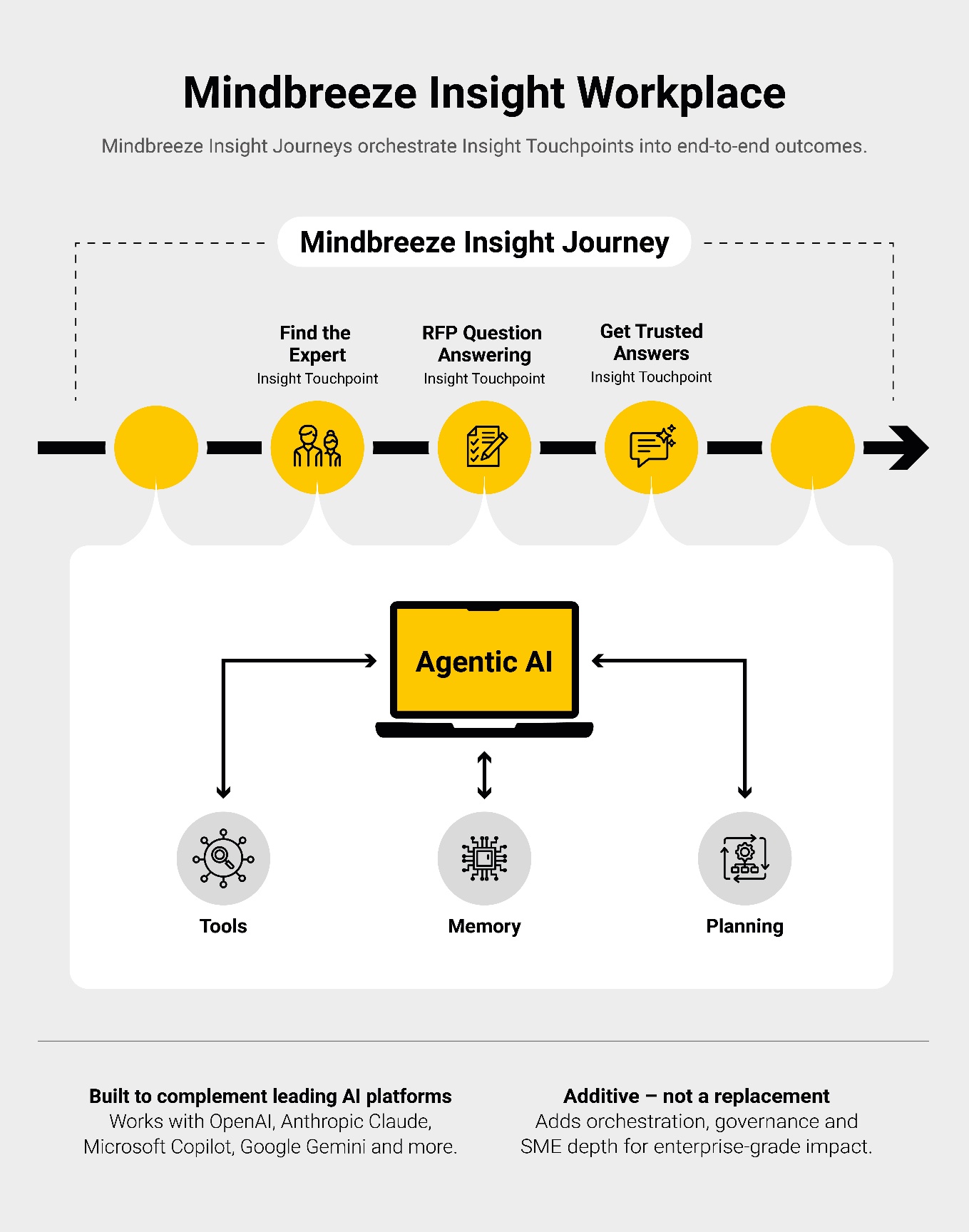
    Hereby, Mindbreeze Insight Touchpoints play a central role because they mark the start of every action, such as searching for experts, completing questionnaires, or engaging with corporate knowledge to find answers.

    Agentic AI works behind each Mindbreeze Insight Touchpoint to prepare the required content in a context-sensitive manner, provides relevant information and intelligently supports subsequent processes. When a user initiates an activity, such as searching for an expert, Agentic AI automatically executes the relevant steps (for example, selecting the appropriate Insight App for display and retrieving the relevant data), documents, saves and continuously improves them.

    An Insight Journey is generated when a user accesses multiple Insight Touchpoints, providing consistent results across various topics without leaving the Insight Workplace.

    This results in seamless, intelligent workflows that specifically reduce employees' daily workload. Decisions can be made faster, routine tasks automated, and knowledge utilized more efficiently, without sacrificing flexibility (“Bring your own LLM”).

    Mindbreeze InSpire supports Gemma 4Permanent link for this heading

    Mindbreeze InSpire expands the selection of available language models to include Gemma 4 in its four variants: E2B, E4B, 26B A4B and 31B. All variants support multimodality, with the E2B and E4B variants additionally enabling audio processing.

    To maximize resource efficiency, highly optimized, quantized variants are available. Administrators can use Gemma 4’s enhanced coding and agent functionalities to significantly expand agentic AI capabilities. Additionally, more comprehensive and detailed processing of GenAI use cases is possible. The “Thinking” mode enables more in-depth reasoning, and a context window of up to 128,000 tokens for the E2B/E4B variants and 256,000 tokens for the 26B A4B/31B variants can be utilized.

    New, Extended and UpdatedPermanent link for this heading

    ApplicationsPermanent link for this heading

    Improved Accessibility When Using ChartsPermanent link for this heading

    The Mindbreeze InSpire 26.3 Release significantly improves accessibility when using charts. With Highcharts updated to version 12.5.0, users can now navigate charts with the keyboard and the chart content is recognized by screen readers.

    SecurityPermanent link for this heading

    Various updatesPermanent link for this heading

    The Mindbreeze InSpire 26.3 Release includes various security updates for Axios, Chromium, Core OS, Dell firmware, Jackson Core, Tomcat and Underscore.

    Additional FeaturesPermanent link for this heading

    Optimized email alerts for easy access to new contentPermanent link for this heading

    Configurable email alerts automatically notify users as soon as new content on relevant topics becomes available. With the release of Mindbreeze InSpire 26.3, users can open and view this content directly via the “Show all results” link in the respective email. This speeds up access to relevant information and increases usability.

    Link to the documentation

    ChangelogPermanent link for this heading

    • Updated: jackson-core to the version 2.21.2 (GHSA-72hv-8253-57qq).
    • Updated: Axios to version 1.15.0 (CVE-2026-40175, GHSA-fvcv-3m26-pcqx, CVE-2025-62718,  GHSA-3p68-rc4w-qgx5).
    • Updated: Tomcat to version 9.0.117 (CVE-2026-34483 (GHSA-rv64-5gf8-9qq8), CVE-2026-29145 (GHSA-95jq-rwvf-vjx4),  CVE-2026-29129 (GHSA-69cc-cv78-qc8g),  CVE-2026-34500 (GHSA-24j9-x2wg-9qv6, CVE-2026-29146 (GHSA-h468-7pvh-8vr8),CVE-2026-25854 (GHSA-9m3c-qcxr-9x87), CVE-2026-34487 (GHSA-x4m4-345f-5h5g), CVE-2026-24880 (GHSA-563x-q5rq-57qp),CVE-2026-32990 (GHSA-8mc5-53m5-3qj2).
    • Updated: underscore.js for CVE-2026-27601.
    • Updated: Dell Firmware (CVE-2024-38798, CVE-2025-2884).
    • Updated: CoreOS Security (CVE-2025-13151, CVE-2026-3805, CVE-2026-3784, CVE-2026-3783, CVE-2026-1965, CVE-2026-3836, CVE-2026-35535).
    • Updated: Chromium to version 147.0.7727.101 (CVE-2026-3909, CVE-2026-3910, CVE-2026-3913, CVE-2026-3914, CVE-2026-3915, CVE-2026-3916, CVE-2026-3917, CVE-2026-3918, CVE-2026-3919, CVE-2026-3920, CVE-2026-3921, CVE-2026-3922, CVE-2026-3923, CVE-2026-3924, CVE-2026-3925, CVE-2026-3926, CVE-2026-3927, CVE-2026-3928, CVE-2026-3929, CVE-2026-3930, CVE-2026-3931, CVE-2026-3932, CVE-2026-3934, CVE-2026-3935, CVE-2026-3936, CVE-2026-3937, CVE-2026-3938, CVE-2026-3939, CVE-2026-3940, CVE-2026-3941, CVE-2026-3942, CVE-2026-4673, CVE-2026-4674, CVE-2026-4675, CVE-2026-4676, CVE-2026-4677, CVE-2026-4678, CVE-2026-4679, CVE-2026-4680, CVE-2026-5273, CVE-2026-5272, CVE-2026-5274, CVE-2026-5275, CVE-2026-5276, CVE-2026-5277, CVE-2026-5278, CVE-2026-5279, CVE-2026-5280, CVE-2026-5281, CVE-2026-5282, CVE-2026-5283, CVE-2026-5284, CVE-2026-5285, CVE-2026-5286, CVE-2026-5287, CVE-2026-5288, CVE-2026-5289, CVE-2026-5290, CVE-2026-5291, CVE-2026-5292, CVE-2026-5858, CVE-2026-5859, CVE-2026-5860, CVE-2026-5861, CVE-2026-5862, CVE-2026-5863, CVE-2026-5864, CVE-2026-5865, CVE-2026-5866, CVE-2026-5867, CVE-2026-5868, CVE-2026-5869, CVE-2026-5870, CVE-2026-5871, CVE-2026-5872, CVE-2026-5873, CVE-2026-5874, CVE-2026-5875, CVE-2026-5876, CVE-2026-5877, CVE-2026-5878, CVE-2026-5879, CVE-2026-5880, CVE-2026-5881, CVE-2026-5882, CVE-2026-5883, CVE-2026-5884, CVE-2026-5885, CVE-2026-5886, CVE-2026-5887, CVE-2026-5888, CVE-2026-5889, CVE-2026-5890, CVE-2026-5891, CVE-2026-5892, CVE-2026-5893, CVE-2026-5894, CVE-2026-5895, CVE-2026-5896, CVE-2026-5897, CVE-2026-5898, CVE-2026-5899, CVE-2026-5900, CVE-2026-5901, CVE-2026-5902, CVE-2026-5903, CVE-2026-5904, CVE-2026-5905, CVE-2026-5906, CVE-2026-5907, CVE-2026-5908, CVE-2026-5909, CVE-2026-5910, CVE-2026-5911, CVE-2026-5912, CVE-2026-5913, CVE-2026-5914, CVE-2026-5915, CVE-2026-5918, CVE-2026-5919, CVE-2026-6296, CVE-2026-6297, CVE-2026-6298, CVE-2026-6299, CVE-2026-6358, CVE-2026-6359, CVE-2026-6300, CVE-2026-6301, CVE-2026-6302, CVE-2026-6303, CVE-2026-6304, CVE-2026-6305, CVE-2026-6306, CVE-2026-6307, CVE-2026-6308, CVE-2026-6309, CVE-2026-6360, CVE-2026-6310, CVE-2026-6311, CVE-2026-6312, CVE-2026-6313, CVE-2026-6314, CVE-2026-6315, CVE-2026-6316, CVE-2026-6361, CVE-2026-6362, CVE-2026-6317, CVE-2026-6363, CVE-2026-6318, CVE-2026-6319, CVE-2026-6364).
    • Updated: Expat to version 2.7.5 (CVE-2026-32776, CVE-2026-32777, CVE-2026-32778).
    • Removed: Deprecated dependency to fix CVE-2026-32933 and CVE-2025-9708.
    • Updated: Dependencies (CVE-2026-22815, CVE-2026-25645, CVE-2026-27448, CVE-2026-27459, CVE-2026-27489, CVE-2026-28500, CVE-2026-30922, CVE-2026-31826, CVE-2026-3219, CVE-2026-32597, CVE-2026-33123, CVE-2026-33230, CVE-2026-33231, CVE-2026-33699, CVE-2026-34070, CVE-2026-34073, CVE-2026-34445, CVE-2026-34446, CVE-2026-34447, CVE-2026-34513, CVE-2026-34514, CVE-2026-34515, CVE-2026-34516, CVE-2026-34517, CVE-2026-34518, CVE-2026-34519, CVE-2026-34520, CVE-2026-34525, CVE-2026-39373, CVE-2026-39892, CVE-2026-40087, CVE-2026-40192, CVE-2026-40260, CVE-2026-40347, CVE-2026-40491, CVE-2026-4539, GHSA-q56x-g2fj-4rj6, GHSA-rf74-v2fm-23pw).
    • Fix for: CVE-2026-31431.
    • Fix for: Linux local privilege escalation (CVE-2026-43284) (DirtyFrag).
    • Updated: Highcharts to version 12.0.4.
    • Added: Settings to prevent Docling from leaking memory.
    • Added: Support for sorting of aggregated properties from “summarize_by”.
    • Added: New configuration setting to tune the accuracy of similarity search answers in very short searches.
    • Added: "Show all results" link to the alert notification email
    • and updating the query parameter for selected data sources.
    • Added: The service properties API supports the export of attributes.
    • Added: Support for location in config json file.
    • Added: The primary logo for the Insight Workplace is themeable and the “Welcome Screen” Touchpoint can be configured.
    • Added: Application option to provide a custom URL for app.telemetry or web.telemetry.
    • Added: Setting for Azure AD for OpenAI LLMs.
    • Fix for: Some facet values were not excluded, when using the "summarize by" feature.
    • Fix for: Changed the generated relative path to an absolute path for icons.
    • Fix for: An issue occurred where resources were not displayed correctly in the AI Chat citations.
    • Fix for: The certificate-based authentication did not work with the national cloud in SharePoint Online.
    • Fix for: Issues with the setting “Use Access Control Lists” in the ServiceNow Connector.
    • Fix for: Certain date constraints were not effective in the search query.
    • Fix for: Custom Apps with trailing “/” in the path were not included in development snaphots.
    • Fix for: For the PersonalizedRelevaceTransformer, a NullPointerException occurred in the Query Log API, if any row had a NULL referrer column in the database table.
    • Fix for: Unnecessary re-authorize occured on Kubernetes healthcheck queries.
    • Fix for: Translation message for "Snapshots" issues.
    • Fix for: Missing font awesome icons in the AI Chat component.
    • Fix for: In the Microsoft File Connector, downloading search results, if smb settings DataEncrypt is set on the file server.
    • Fix for: Resolution of default app fragments in 360-Degree views.
    • Fix for: Making “getAnnotations” robust against undefined values.
    • Fix for: Issue with the resizing of “Progress done” icon in the Insight Workplace.
    • Improved: Anonymization of index data in the Index Sampling Tool.
    • Improved: Performance was optimized with the crawling of document libraries based on Root-Folder configuration in the SharePoint Online Connector.
    • Improved: Removal of citations for follow-up questions.
    • Improved: Content is handled directly, if deferred mode is deactivated in query parameters.
    • Improved: The number of searches required for Interactive Exploded Views was optimized.
    • Changed: The endpoint “/nosample/find” now uses “detail_limit DOCUMENT_HIT”.
    • Changed: Images were adjusted in the main menu sidebar of the Management Center and in Insight Services for RAG.
    • Changed: The loading icon for Touchpoints is now black in the Insight Workplace.
    • Changed: The “Progress done” icon is now black in the Insight Workplace.
    • Removed: Limit for “termhitcount” in “/aggregate” servlet statistics calculation.

    Download PDF

    • Release Notes 26.3 Release - Mindbreeze InSpire

    Content

    • Release Highlights
    • New, Extended and Updated
    • Changelog

    Download PDF

    • Release Notes 26.3 Release - Mindbreeze InSpire