


Sure, you can handle it. But should you?
Let our experts manage the tech maintenance while you focus on your business.
Let our experts manage the tech maintenance while you focus on your business.
Release Notes for Mindbreeze InSpire
Version 26.6
Release Highlights
Mindbreeze Insight Workplace
The Mindbreeze InSpire 26.6 Release introduces new features for the Mindbreeze Insight Workplace. Users can now easily rate the quality of the generated answers with the feedback feature. Feedback can consist of either a rating (thumbs up/thumbs down) or a detailed comment entered in the comment field, along with a selection of keywords.
Administrators and Knowledge Managers can analyze the submitted feedback in app.telemetry and use the Analytics Insight Touchpoint to derive datasets for automated testing. This allows the RAG pipeline to be tailored even more precisely to users’ needs.
In addition, the PDF preview for large documents has been optimized. The improved rendering process enables faster and smoother navigation, even within large PDF documents.
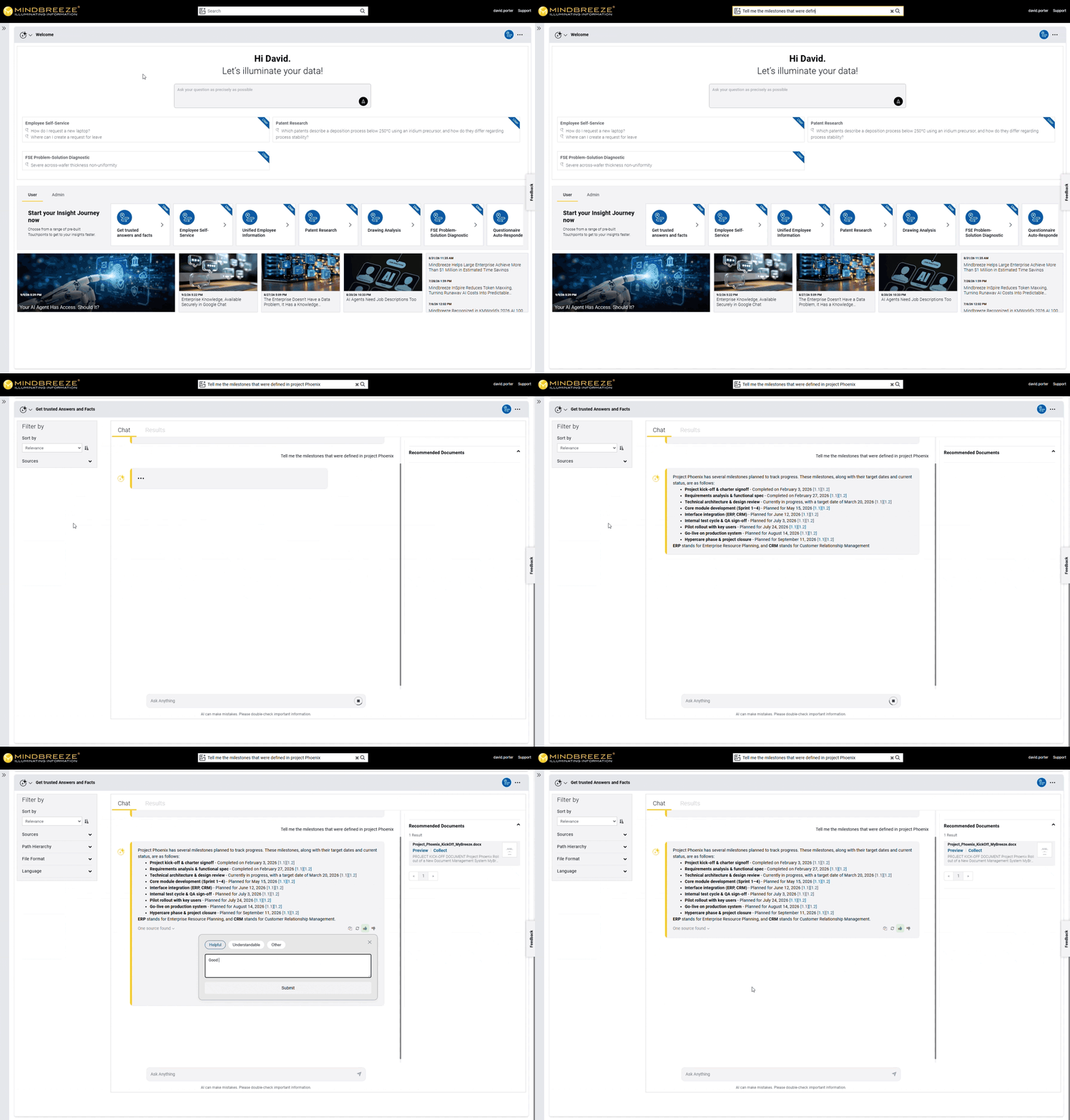
The new saving feature streamlines reusing Insight Touchpoints and Insight Journeys. Users can save Insight Touchpoints and Insight Journeys as they wish so they can reuse them immediately when they reopen the Insight Workplace. The content of saved Insight Touchpoints and Insight Journeys is updated when they are reused. This ensures that the updated content is available to users in the saved Insight Touchpoints and workflows, just as usual.
Administrators have two modes available when configuring the saving feature:
- Automatic saving, to save all created Insight Touchpoints and Insight Journeys.
- Manual saving, where users themselves determine which Insight Touchpoints and Insight Journeys should be saved.
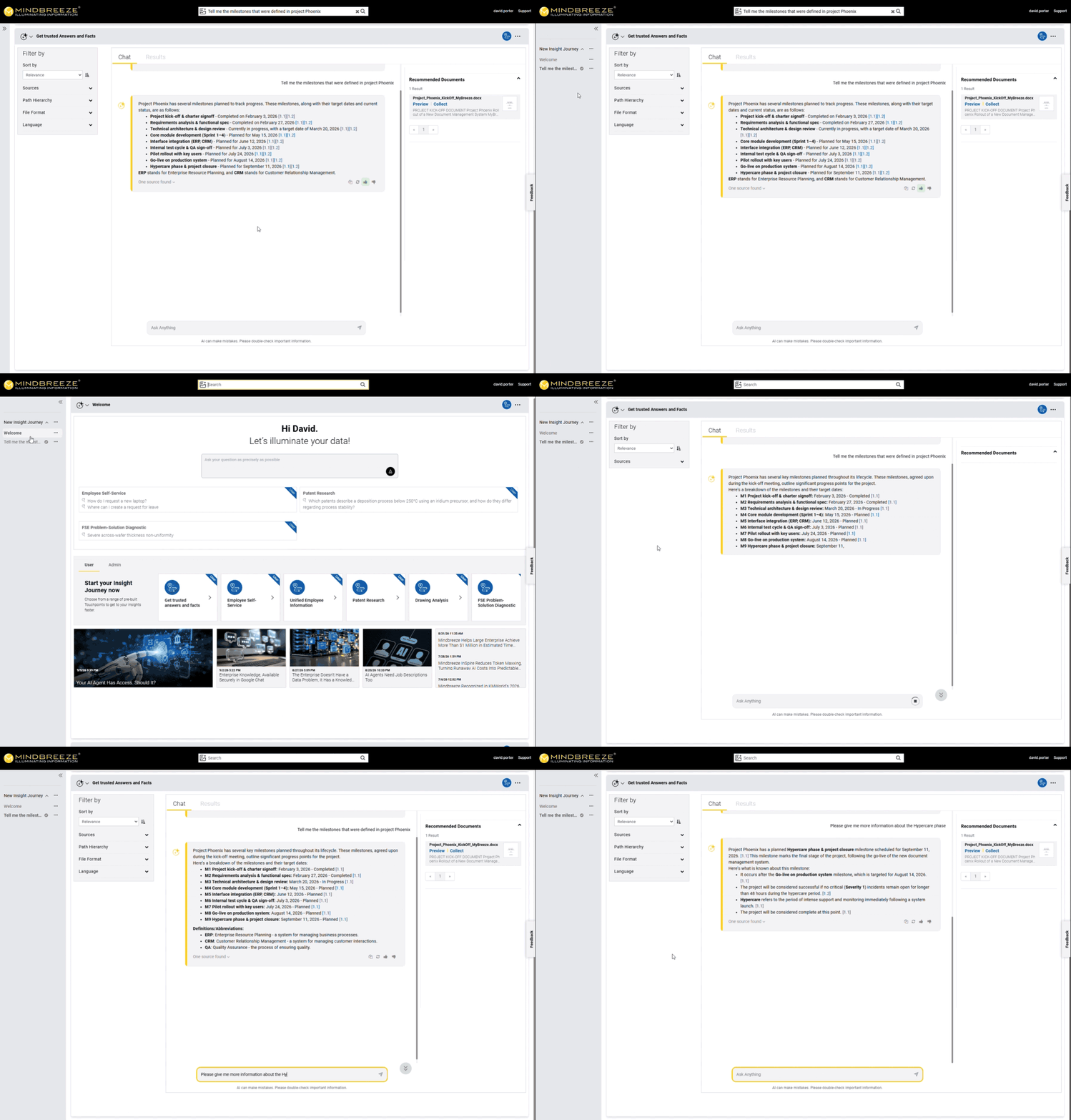
Administrators can now configure how Insight Touchpoints are displayed in the Insight Workplace. By default, whenever an interaction leads to a new Insight Touchpoint, it is generated and appended to the Insight Journey, where it is displayed as a separate section and focused on. Users can navigate between individual Insight Touchpoints by scrolling or access them directly via the sidebar, where they are displayed as part of the Insight Journey.
A new feature is the ability to display only the results of the currently active Insight Touchpoint in the Insight Workplace — for a more compact and organized Insight Workplace. Even when only the currently active Insight Touchpoint is displayed, the other Insight Touchpoints remain available at all times. They continue to appear in the sidebar as individual Insight Touchpoints within the Insight Journey and can be accessed directly from there.
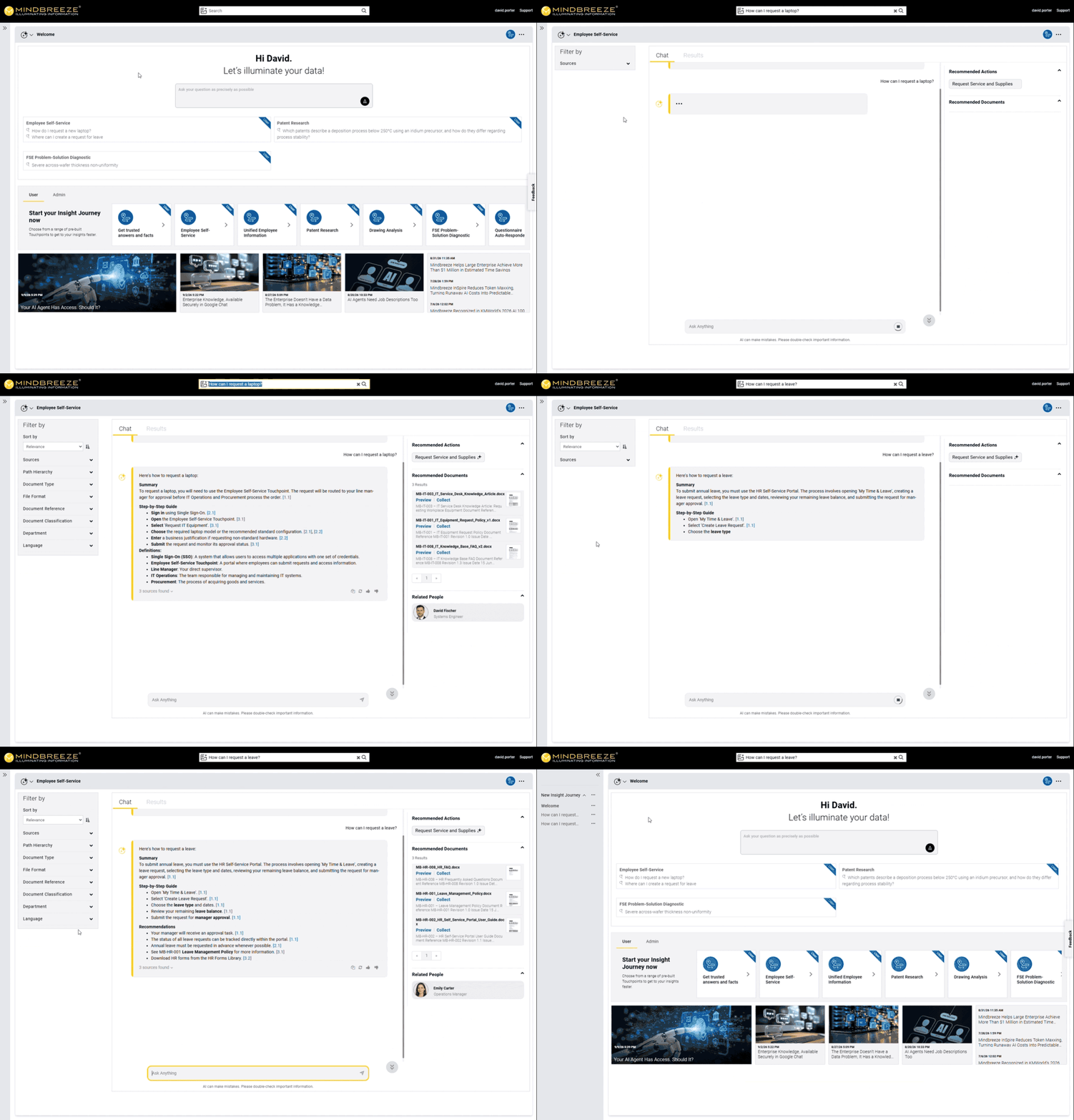
Optimized API Tool Calling in Mindbreeze InSpire
Since the 26.5 Release, Mindbreeze customers have been able to integrate Mindbreeze InSpire API tools into their AI agents via the Model Context Protocol (MCP) to process entirely new use cases in a fact-based and rights-verified manner. As part of ongoing development, API tool calling has been optimized in the Mindbreeze InSpire 26.6 Release and is now available for AI agents.
The optimization of API tool calling is possible due to a streamlined workflow, enabling AI agents to execute the appropriate Mindbreeze InSpire API tool more efficiently. As a result, AI agents that use Mindbreeze InSpire API tools are able to perform various tasks more efficiently while maintaining a consistently high level of quality.
New, Extended and Updated
Applications
Optimized display of markdown tables in Mindbreeze InSpire AI Chat and AI Answers
Mindbreeze users get an optimized display of tables that originate from Markdown documents in the Mindbreeze InSpire AI Chat and in AI Answers. The generated answer adjusts the display of the table to simplify comprehension and support the interpretation of the table’s content.
Colored highlighting of answer content in the HTML Preview
In addition to the PDF preview, colored highlighting of text passages from generated answers is now also available in the HTML preview. This allows Mindbreeze users to quickly and intuitively locate the corresponding sections in the original HTML document.
Security
Various updates
The Mindbreeze InSpire 26.6 Release includes various security updates for Chromium, Core OS, Expat, HTTPD, Java OpenJDK and Tomcat.
Additional Features
Mindbreeze InSpire Cloud Native – Grafana Dashboards and simplified configuration of database credentials now available
With the Mindbreeze InSpire 26.6 Release, administrators can use Grafana dashboards to obtain comprehensive information about their instances. This includes, for example, the current status and deployment of producers and consumers, the number of container restarts performed, and CPU, network and storage usage. Thanks to the dashboard information, administrators can identify problems more quickly to resolve them or initiate preventive measures.
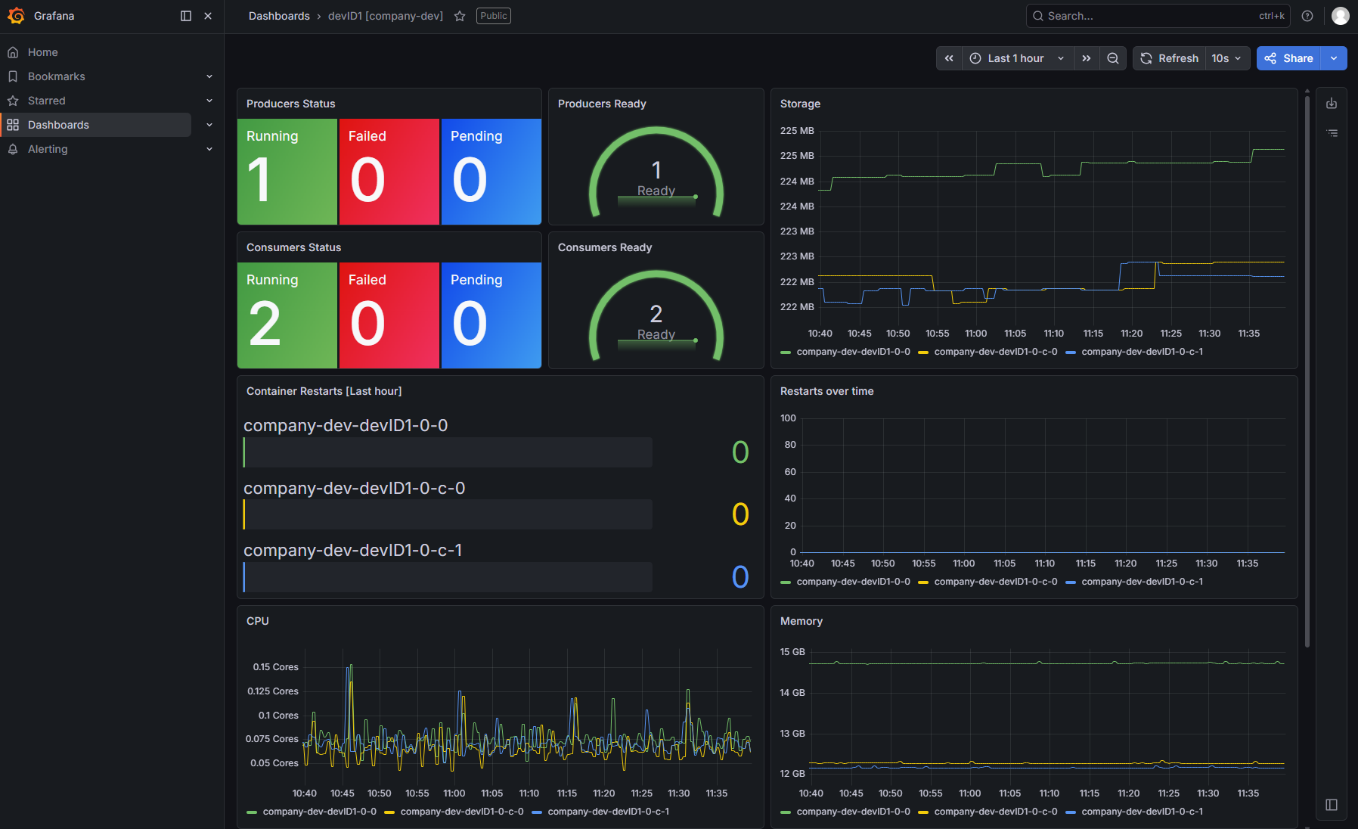
In addition, configuring credentials is now easier. By providing database credentials as secrets, the system automatically creates the required endpoint with the credentials when a matching JDBC URL is provided. This allows administrators to manage database credentials more easily while maintaining a high level of security.
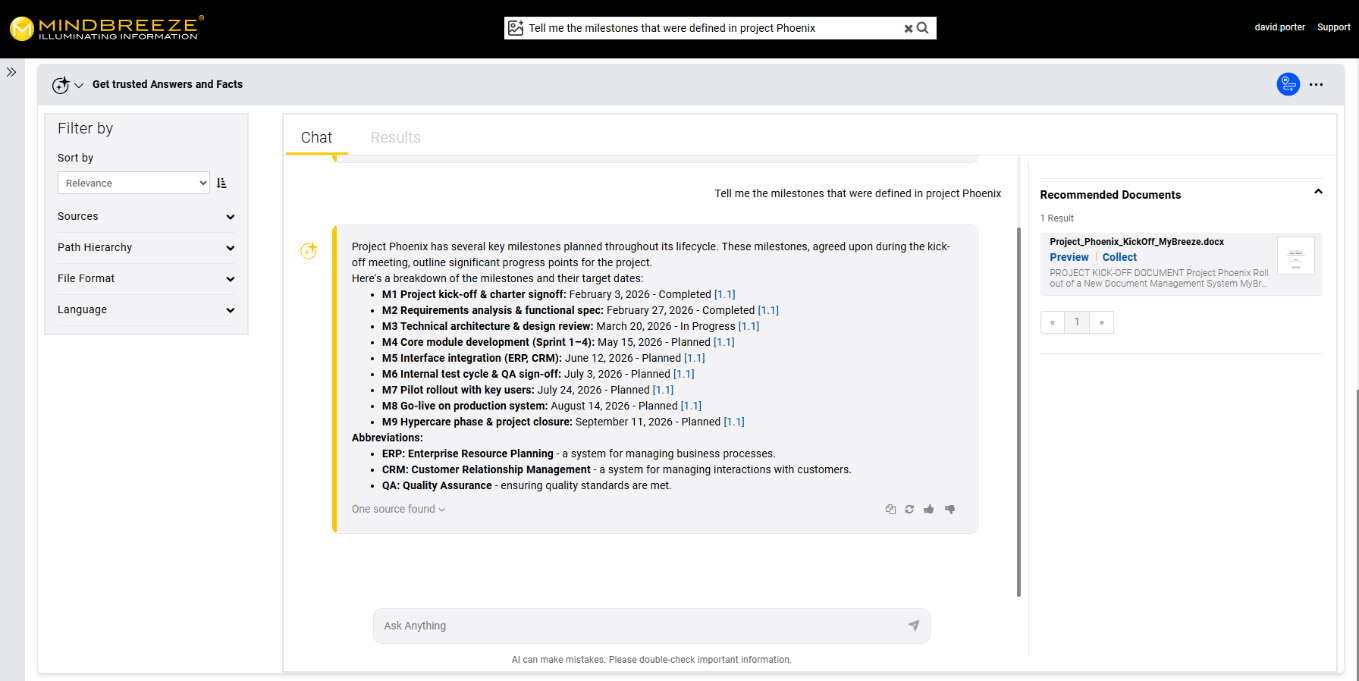
Configurable AI Disclaimer for Mindbreeze InSpire AI Chat and AI Answers
Starting with this release, the AI disclaimer is more prominently displayed in the Mindbreeze InSpire AI Chat and in the AI Answers. For administrators, additional configuration options are available to customize the text.
Changelog
Hotfix 1 (26.6.1.531)
- Updated: Highcharts to version v12.6.2 to resolve an AST (Abstract Syntax Tree) HTML sanitizer bypass vulnerability, which ensures proper sanitization of SVG text and HTML labels and prevents potential Cross-Site Scripting (XSS) execution.
- Removed: unstructured.io Partition Service.
- Fix for: Snapshot resources were not applied in Kubernetes in some conditions.
- Fix for: The default value for “max_completion_tokens” was removed to prevent empty generation with reasoning models.
- Fix for: Missing translations in the Insight App Designer.
- Changed: RAG Service is now automatically selected.
26.6.0.482
- Updated: Chromium to version 151.0.7922.169 (CVE-2026-15112,CVE-2026-15129,CVE-2026-15132,CVE-2026-15133,CVE-2026-15108,CVE-2026-15109,CVE-2026-15110,CVE-2026-15111,CVE-2026-15113,CVE-2026-15114,CVE-2026-15115,CVE-2026-15116,CVE-2026-15117,CVE-2026-15118,CVE-2026-15119,CVE-2026-15120,CVE-2026-15121,CVE-2026-15122,CVE-2026-15123,CVE-2026-15124,CVE-2026-15125,CVE-2026-15126,CVE-2026-15127,CVE-2026-15128,CVE-2026-15130,CVE-2026-15764,CVE-2026-15765,CVE-2026-15766,CVE-2026-15767,CVE-2026-15768,CVE-2026-15769,CVE-2026-15770,CVE-2026-15771,CVE-2026-15772,CVE-2026-15773,CVE-2026-15774,CVE-2026-15775,CVE-2026-15776,CVE-2026-15777,CVE-2026-15778,CVE-2026-15899,CVE-2026-15900,CVE-2026-15901,CVE-2026-15902,CVE-2026-15903,CVE-2026-15904,CVE-2026-15905,CVE-2026-16420,CVE-2026-16421,CVE-2026-16413,CVE-2026-16414,CVE-2026-16415,CVE-2026-16416,CVE-2026-16417,CVE-2026-16418,CVE-2026-16419,CVE-2026-16422,CVE-2026-16423,CVE-2026-16424,CVE-2026-16807,CVE-2026-16806,CVE-2026-16805,CVE-2026-16804,CVE-2026-17650,CVE-2026-17651,CVE-2026-17652,CVE-2026-17653,CVE-2026-17654,CVE-2026-17655,CVE-2026-17656,CVE-2026-17657,CVE-2026-17658,CVE-2026-17659,CVE-2026-17660,CVE-2026-17661,CVE-2026-17662,CVE-2026-17663,CVE-2026-17664,CVE-2026-17665,CVE-2026-17666,CVE-2026-17667,CVE-2026-17668,CVE-2026-17669,CVE-2026-17670,CVE-2026-17671,CVE-2026-17672,CVE-2026-17673,CVE-2026-17674,CVE-2026-17675,CVE-2026-17676,CVE-2026-17677,CVE-2026-17678,CVE-2026-17679,CVE-2026-17680,CVE-2026-17681,CVE-2026-17682,CVE-2026-17683,CVE-2026-17684,CVE-2026-17685,CVE-2026-17686,CVE-2026-17687,CVE-2026-17688,CVE-2026-17689,CVE-2026-17690,CVE-2026-17691,CVE-2026-17692,CVE-2026-17693,CVE-2026-17694,CVE-2026-17695,CVE-2026-17696,CVE-2026-17697,CVE-2026-17698,CVE-2026-17699,CVE-2026-17700,CVE-2026-17701,CVE-2026-17702,CVE-2026-17703,CVE-2026-17704,CVE-2026-17705,CVE-2026-17706,CVE-2026-17707,CVE-2026-17708,CVE-2026-17709,CVE-2026-17710,CVE-2026-17711,CVE-2026-17712,CVE-2026-17713,CVE-2026-17714,CVE-2026-17715,CVE-2026-17716,CVE-2026-17717,CVE-2026-17718,CVE-2026-17719,CVE-2026-17720,CVE-2026-17721,CVE-2026-17722,CVE-2026-17723,CVE-2026-17724,CVE-2026-17725,CVE-2026-17726,CVE-2026-17727,CVE-2026-19137,CVE-2026-19149,CVE-2026-19154,CVE-2026-19157,CVE-2026-19170,CVE-2026-19172,CVE-2026-19169,CVE-2026-19168,CVE-2026-19138,CVE-2026-19139,CVE-2026-19140,CVE-2026-19141,CVE-2026-19142,CVE-2026-19143,CVE-2026-19144,CVE-2026-19145,CVE-2026-19146,CVE-2026-19147,CVE-2026-19148,CVE-2026-19150,CVE-2026-19151,CVE-2026-19152,CVE-2026-19153,CVE-2026-19155,CVE-2026-19156,CVE-2026-19158,CVE-2026-19159,CVE-2026-19160,CVE-2026-19161,CVE-2026-19162,CVE-2026-19163,CVE-2026-19164,CVE-2026-19165,CVE-2026-19166,CVE-2026-19167,CVE-2026-19171,CVE-2026-19173,CVE-2026-19174,CVE-2026-19175,CVE-2026-19176,CVE-2026-19177,CVE-2026-19556,CVE-2026-19557,CVE-2026-19558,CVE-2026-19559,CVE-2026-19560,CVE-2026-76034,CVE-2026-76036,CVE-2026-76033,CVE-2026-76037,CVE-2026-76044,CVE-2026-76039,CVE-2026-76040,CVE-2026-76035,CVE-2026-76042,CVE-2026-76046,CVE-2026-76043,CVE-2026-76041,CVE-2026-76047,CVE-2026-76038,CVE-2026-76045)
- Updated: Java OpenJDK to version 8u502, 17.0.20, 21.0.12.
- Updated: Tomcat to version 9.0.120.
- Updated: CoreOS to version 44.20260802.3.1 (CVE-2026-50195,CVE-2026-53492,CVE-2026-53489,CVE-2026-47262,CVE-2026-54369,CVE-2026-54370,CVE-2026-54371,CVE-2026-44517,CVE-2026-33630,CVE-2026-60002,CVE-2026-59996,GHSA-4q85-33p6-j5g6,GHSA-46fr-jh49-xvhx,GHSA-2hqh-5c36-grrm,CVE-2026-39828,CVE-2026-39829,CVE-2026-39830,CVE-2026-13757,CVE-2026-54411,CVE-2026-55654,CVE-2026-55655,CVE-2026-55653,CVE-2026-27145,FEDORA-2026-230ba36543,CVE-2026-44604,CVE-2026-44605,CVE-2026-52791,FEDORA-2026-864f36550e,CVE-2026-56391,CVE-2026-18938,CVE-2026-68480,FEDORA-2026-d232156d86,FEDORA-2026-c53019ed4f,CVE-2026-64564,CVE-2026-64561).
- Updated: Expat to version 2.8.3.
- Updated: Java OpenJDK to version 1.8.0.504, 17.0.20.1.1, 21.0.12.1.1.
- Updated: Python Protobuf to version 5.29.6.
- Fix for: Keycloak critical security issue (CVE-2026-18963).
- Updated: pdfjs to the latest version.
- Updated: Base OS for the containers “inspire-system-loader” and “inspire-system-manager” to AlmaLinux 9.
- Updated: apptelemetry-infra-operator in InSpire helm chart.
- Added: Highlights are fully themeable via introduced customizable color variables in the PDF preview.
- Added: Generic secrets can be provided in InSpire helm chart.
- Added: Signed SBOM with VEX attached to Kubernetes container.
- Added: Support for CommonMark tables in the CommonMark filter plugin.
- Added: Support for page break markers in the CommonMark filter plugin.
- Added: Support for showing a single Insight Touchpoint at a time, instead of displaying all Insight Touchpoints and navigating through them via scrolling in the Insight Workplace.
- Added: Generated answers can now be evaluated via a feedback feature in the AI Chat and AI Answers.
- Added: Developer Settings to the Mindbreeze InSpire iOS App.
- Added: AI Disclaimer text for AI Answers and AI Chat.
- Added: Snapshot upload was refactored to stream the file directly and to fix failures on large file uploads (2–3 GB).
- Added: A circular progress bar with upload percentage for the upload of Snapshots.
- Added: Highlighting to the answer opened in HTML preview.
- Fix for: Verbose logging in Notification Service.
- Fix for: Action buttons were missing in mobile viewports due to the toggle box failing to open.
- Fix for: Insight Workplace and Insight Services for RAG needed feature flags.
- Fix for: API Tool Call overhead was reduced due to the overhead being too much.
- Fix for: Client notifications were broken.
- Fix for: Delete events were not skipped from not included documents in the Microsoft SharePoint Connector.
- Fix for: RAG dataset export was not clickable on small screens.
- Fix for: QueryExprParser did not handle term series correctly when query contains labeled expressions.
- Fix for: High CPU usage of the checkGPU script.
- Fix for: Some Markdown documents possibly crashed content filter processing which resulted in missing documents in the index.
- Fix for: "Stop responding" button did not terminate the response generation.
- Fix for: Hover-text for chat sources was incorrect.
- Fix for: Fresh RAG Service failed to start on Consumer.
- Fix for: Java SDK `ValueParser` did not set `AGGREGATED` flag on generated annotations.
- Fix for: Published tools could not be called after sync.
- Fix for: Client Service setting "Maximum Request Answer Length" was not functional.
- Improved: Sub queries use “HitInfoAppender” for current context expressions ("."), e.g. used in similarity search with "optimize=true".
- Improved: Index setting "Property Expressions For Identifying Page Annotations" now supports mutliple patterns.
- Improved: Sidebar navigation in Insight Workplace.
- Improved: Mesnode rebusness by restarting crashed services after fixed erroneous configuration.
- Improved: The robustness of the addActionsToTextExtracts function.
- Changed: Container Images are signed and contain a signed VEX document.
- Removed: Unused “Content Fetch Timeout” configuration option from the Client Service Configuration.
- Removed: Unused settings for downloading OneNote files as HTML via Graph API (deprecated since March 2025).