


Sure, you can handle it. But should you?
Let our experts manage the tech maintenance while you focus on your business.
Let our experts manage the tech maintenance while you focus on your business.
Whitepaper
Create Mindbreeze InSpire Appliance in AWS GovCloud
Introduction
Mindbreeze InSpire is available on the Amazon Web Services GovCloud (AWS GovCloud). The creation of a Mindbreeze InSpire appliance will be explained in the following chapters.
Prerequisites
- An existing AWS account
- For more information, see https://aws.amazon.com/account/
- An existing AWS GovCloud account
- For more information, see https://aws.amazon.com/govcloud-us/getting-started/
- A purchased Mindbreeze InSpire license
- For more information, see https://aws.amazon.com/marketplace/seller-profile?id=6c848319-9f33-4099-ad7e-acdfb4914933
- Sufficient resources to host Development (DEV), Accepted (ACC) and Production (PROD) servers.
- For more information, see step 4 “Launch the instance in GovCloud” in the following chapter “Step by Step Guide”.
Configuration
Overview
Step by Step Guide
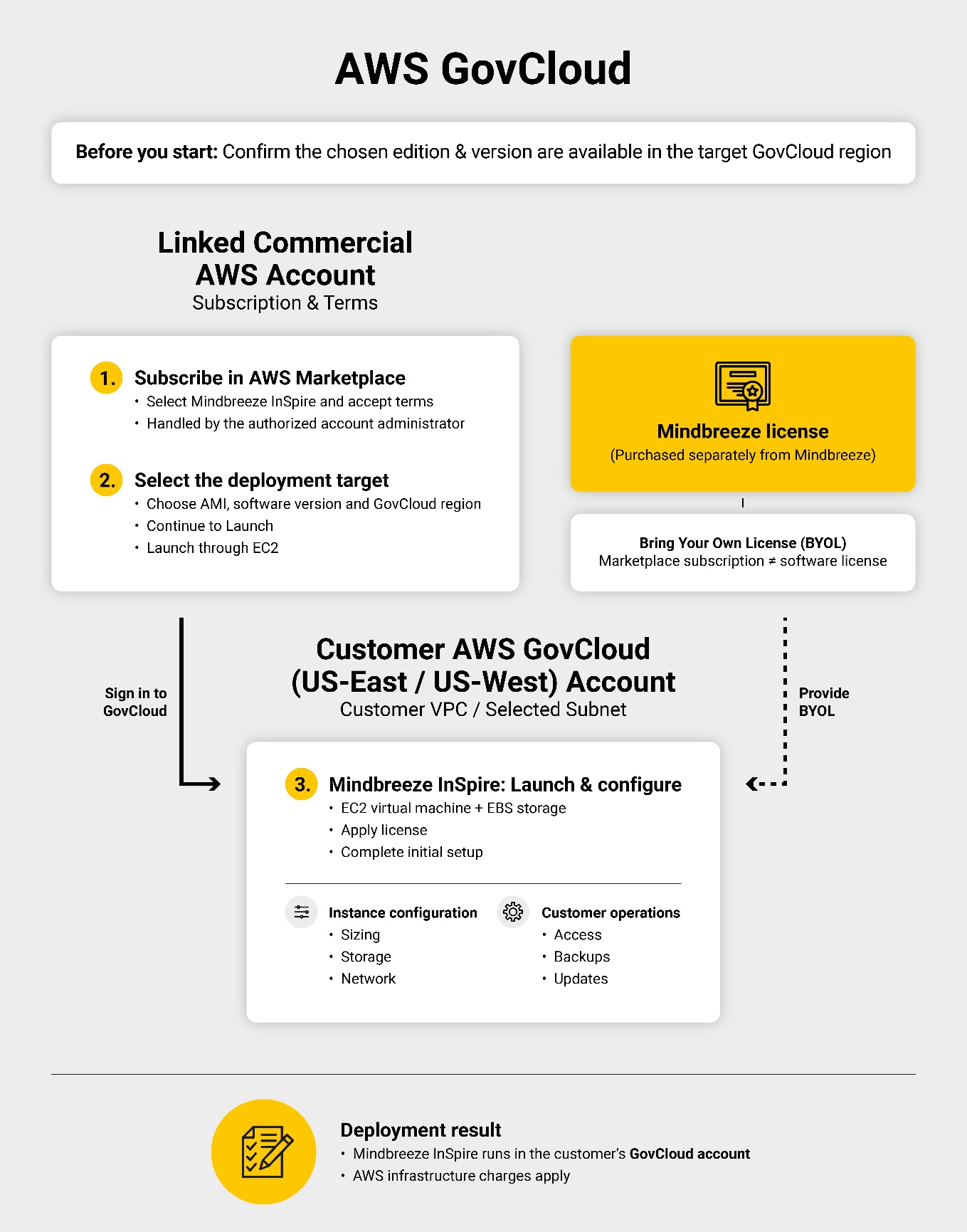
To use Mindbreeze InSpire in AWS GovCloud, the customer must subscribe to the Marketplace offering through the linked commercial AWS account and then launch the VM in their GovCloud account. For more information, see Mindbreeze - Amazon Web Services and aws.amazon.com.
Please perform the following steps to create a Mindbreeze InSpire appliance in AWS GovCloud:
- Find the Mindbreeze offering and check regional availability
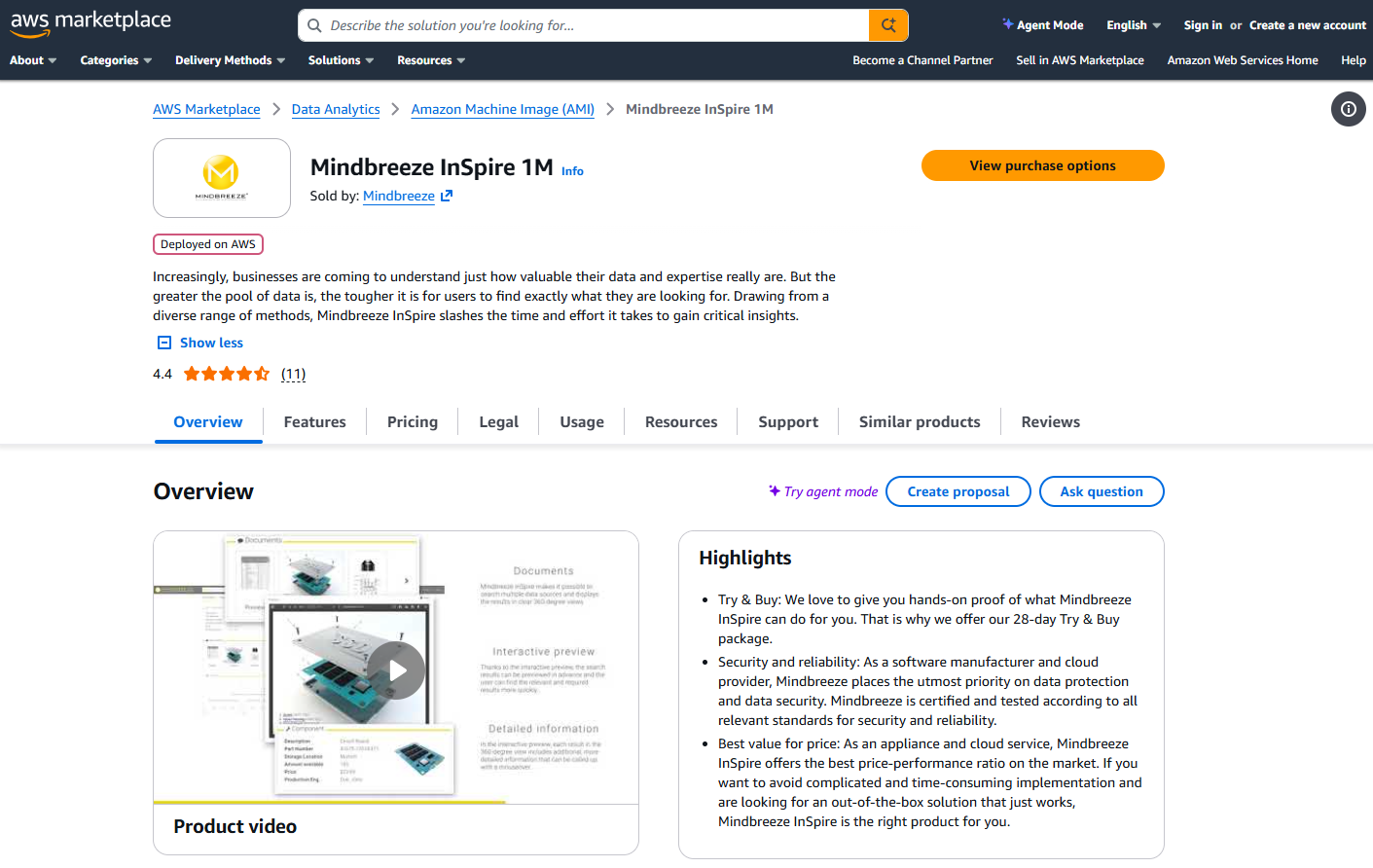
- Search for “Mindbreeze InSpire” in AWS Marketplace. Confirm that the required edition and version are available in AWS GovCloud (US-East) or AWS GovCloud (US-West).
- Subscribe through the linked commercial AWS account
- Select “View purchase options” and accept the terms. If the GovCloud administrator cannot access the linked commercial account, the responsible AWS account administrator must complete this step.
- Select the GovCloud region
- Under “Continue to Configuration,” select the AMI delivery option, software version, and target GovCloud region.
- Launch the instance in GovCloud
- Select “Continue to Launch”, then “Launch through EC2” and then sign in to the GovCloud account, configure the instance, and launch it.
- For more information, see https://aws.amazon.com/blogs/awsmarketplace/deploy-aws-marketplace-third-party-software-to-aws-govcloud-us-using-amazon-ec2-console/.
Be aware that sufficient resources will be needed to host the following three servers:
- Development (DEV)
- The server where the Mindbreeze InSpire project is actively being developed by Mindbreeze developers.
- Accepted (ACC)
- The server that hosts the current state of the Mindbreeze InSpire project to be reviewed by the customer.
- Production (PROD)
- The server that hosts the productive state of the Mindbreeze InSpire project.
- Configure and license Mindbreeze InSpire
- Configure instance sizing, networking, and storage according to the Mindbreeze deployment guide, then complete initial setup. For example, the Mindbreeze InSpire 1M appliance requires at least 1.7 TB of SSD storage, and the guide includes a step to expand the data partition. For more information, see Whitepaper - Create AWS 1M InSpire Appliance - Resizing the data disk partition using the resize service.
- A separate Mindbreeze license is required under the “Bring Your Own License” (BYOL) model. Subscribing through Marketplace does not replace purchasing the software license. AWS infrastructure charges also apply. For more information, see https://aws.amazon.com/marketplace/pp/prodview-gvqpmbypd7ui4?applicationId=AWSMPContessa&ref_=beagle&sr=0-2.
With the configuration completed, the Mindbreeze InSpire appliance is fully created on AWS GovCloud.
Troubleshooting
The GovCloud region is not selectable
Mindbreeze InSpire is available worldwide via Amazon Web Services. If any problems with the GovCloud region occur, please contact the Mindbreeze Support.