


Sure, you can handle it. But should you?
Let our experts manage the tech maintenance while you focus on your business.
Let our experts manage the tech maintenance while you focus on your business.
ServiceNow Connector
Installation and Configuration
Introduction
Using the ServiceNow connector, you can connect your ServiceNow instance to Mindbreeze InSpire.
Please be aware that certain types of ServiceNow authorizations are not displayed in the connector, which may prevent the documents concerned from being found by the Mindbreeze InSpire search. The following authorization types are NOT supported:
- “User Criteria”
- if “Advanced” is set (“Script”, except if the User Criteria was generated by an "HR Criteria”)
- “Access Control Lists” (ACLs)
- ACLs that are defined at the column level (e.g. [incident].[active]); however, table-level ACLs are supported (e.g. [incident].[-- None --]).
- ACLs with “Condition” or “Script” (however, “Requires role” is supported).
- ACLs with the decision type “Deny Unless” (to prevent unauthorized access to documents, ACLs with the “Deny Unless” decision type result in a “DENY everyone” ACL for the table and its documents).
Installation
Before installing the ServiceNow connector, make sure that the Mindbreeze server is installed and the ServiceNow connector is included in the license.
Configuring ServiceNow
To enable Mindbreeze InSpire to connect to your ServiceNow instance, you first need to configure your ServiceNow instance.
Creating a crawler user
Create a new user in ServiceNow that can be used in the Mindbreeze ServiceNow connector to crawl ServiceNow (see ServiceNow document: Create a user). For this, the user must have the following roles:
- rest_api_explorer
- web_service_admin
The user must also have read access to the necessary tables. This can be achieved in two different ways:
- Either the crawler user is assigned the role of “admin” and also the role “snc_read_only,” so that only read-only access is granted for all the tables that are already authorized (recommended option)
- Permissions are set for tables at a granular level (see appendix: Granular crawler permissions)
Creating an OAuth2 client
Enable OAuth2 in your ServiceNow instance and create a new OAuth2 application. See the ServiceNow documentation: Enable OAuth with inbound REST
Configuring Mindbreeze
To begin configuration, open the Mindbreeze Management Center in your browser.
Configuring the index
Add a new index in the Indices tab with the +Add Index button. Select the desired Index Node and Client Service and enter the data source ServiceNow in the Data Source field. Afterwards, confirm your entries by clicking the Apply button.
Configuring the datasource
Now you can configure the data source.
Legend:
- Properties marked with an *: required fields – these must be explicitly configured
- Properties not specifically marked: optional fields
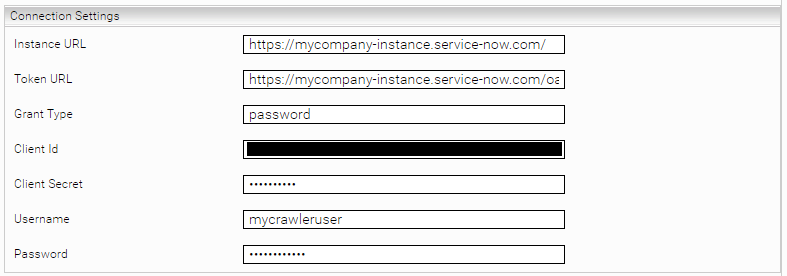
Connection settings

Setting | Description | ||||||||||||
Instance URL* | The URL of the ServiceNow instance. Example: https://myorganization.service-now.com/ | ||||||||||||
ServiceNow Credential* | The credential previously created in the tab “Network”. The credential must be configured as OAuth 2 credential and with the following settings:
| ||||||||||||
[Deprecated] Token URL | This setting is deprecated and should always be left empty. Please use the setting “ServiceNow Credential” instead. | ||||||||||||
[Deprecated] Client ID | This setting is deprecated and should always be left empty. Please use the setting “ServiceNow Credential” instead. | ||||||||||||
[Deprecated] Client Secret | This setting is deprecated and should always be left empty. Please use the setting “ServiceNow Credential” instead. | ||||||||||||
[Deprecated] Username | This setting is deprecated and should always be left empty. Please use the setting “ServiceNow Credential” instead. | ||||||||||||
[Deprecated] Password | This setting is deprecated and should always be left empty. Please use the setting “ServiceNow Credential” instead. |
Download settings
Setting | Description |
Page Size | The page size of the REST API bulk requests (default 1000) |
Document Types (Tables)
Setting | Description |
Index Knowledge Articles | When enabled, the table is indexed (for example, if “Index Knowledge Articles” is enabled, knowledge articles are crawled). Default setting: Activated |
Constraint Query for Knowledge Articles | Restricts the crawler to index only specific knowledge articles. For more information, see the chapter Constraint queries. |
Index Catalog Items | When enabled, the table is indexed (for example, if “Index Catalog Items” is enabled, catalog items are crawled). Default setting: Activated |
Constraint Query for Catalog Items | Restricts the crawler to index only specific catalog items. For more information, see the chapter Constraint queries. |
Index Incidents | When enabled, the table is indexed (for example, if “Index Incidents” is enabled, incidents are crawled). Default setting: Activated |
Constraint Query for Incidents | Restricts the crawler to index only specific incidents. For more information, see the chapter Constraint queries. |
Index Problems | When enabled, the table is indexed (for example, if “Index Problems” is enabled, problems are crawled). Default setting: Activated |
Constraint Query for Problems | Restricts the crawler to index only specific problems. For more information, see the chapter Constraint queries. |
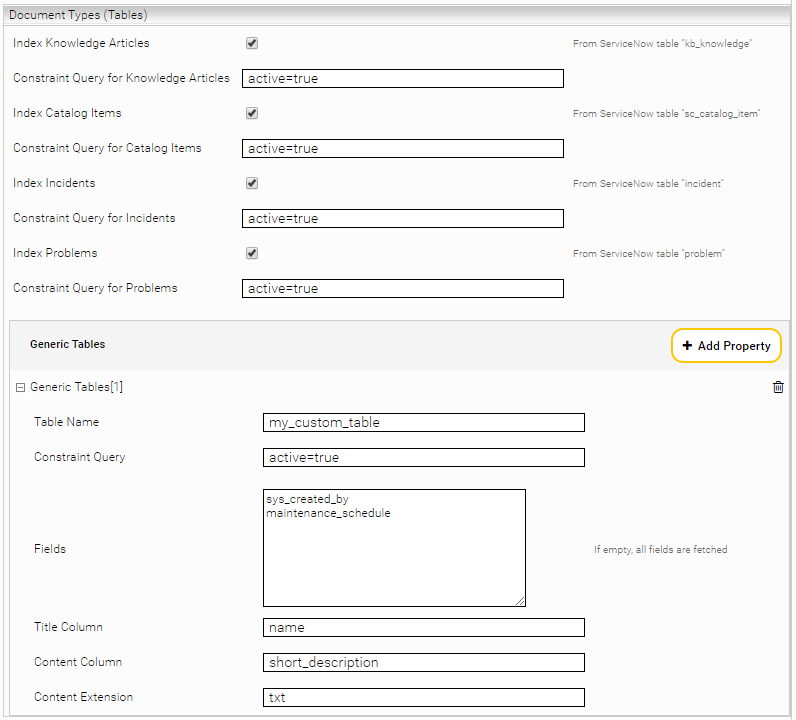
Generic Tables Defines tables for indexing that are not knowledge articles, catalog items, incidents, or problems. | |
Table Name* | The name of the table. |
Constraint Query | Limits the records to be indexed using the ServiceNow filter. For more information, see the chapter Constraint queries. |
Fields | A list of the table columns to be indexed (separated by a line break). If the list has no entries, all columns are indexed. |
Title Column* | The column name to be used as the title. |
Content Column | The column name to be used as document content. |
Content Extension | The file extension (such as txt or html). Only relevant if Content Column is set. |
ServiceNow Cache Settings

Setting | Description |
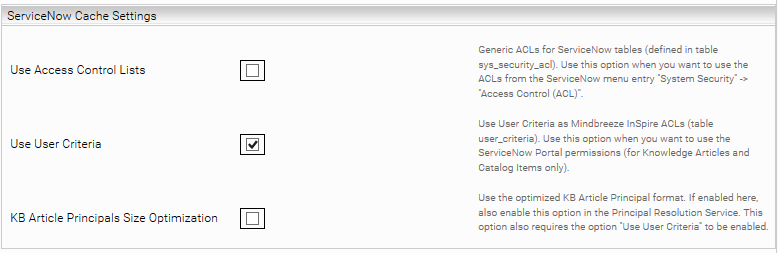
Use Access Control Lists | Roles of ServiceNow ACLs are set to Mindbreeze documents. Only ACLs at the table level (no support at the column level) are included. In addition, the “Condition” and “Script” fields are not supported. Use this option if you are using “Resolve ACLs” in the principal resolution service. |
Use User Criteria | ServiceNow user criteria are set as Mindbreeze ACLs on knowledge articles and catalog items. The “Script” field is not supported. Use this option if you use the option “Resolve User Criteria” in the principal resolution service. |
Extended User Criteria Conditions | Extended User Criteria Conditions that are resolved in the ServiceNow Caching Principal Resolution Service. If there are Extended User Criteria Conditions in ServiceNow that are not specified here, documents that use these conditions cannot be found. Since in this case more requests have to be made against the ServiceNow API, this can also have a negative impact on the crawling speed. Important: Configure this option identically to the option in the ServiceNow Caching Principal Resolution Service. Otherwise, the permission structure cannot be mapped correctly. |
KB Article Principals Size Optimization (Advanced Setting) | Reduces the number of principal containers when user criteria are used. This option is active by default and should not normally be disabled. However, if it is to be disabled anyway, then it must also be disabled in CachingServiceNowPrincipalResolutionService for the permissions to work correctly. |
Enable Default ACLs | If no ACLs are fetched for a document, ACL principals that are defined in the following setting “Default ACL Principals” will be applied. |
Default ACL Principals | Defines a list of principals that will be applied when the previous setting “Enable Default ACLs” is activated. One principal per line can be defined. Default setting: “everyone” |
If you use the “Use Access Control Lists” option, ACL references must be configured in the index. To do this, enable the “Use ACL References” option in the advanced settings of the index configuration.
In addition, we recommend that you configure the following options to hide documents in the search that are only used as ACL references:
Setting | Entry |
Dynamic Constraint Source Expr | category:Undefined |
Dynamic Constraint Pattern | NOT aclReference:true |
Dynamic Constraint Static Fraction | NOT aclReference:true |
CSV Logging
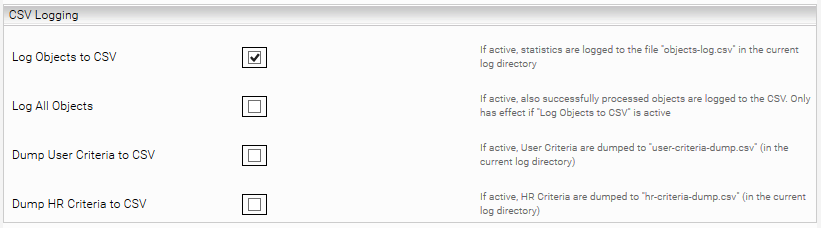
ServiceNow user criteria that are not supported by this plugin are logged in “objects-log.csv” in the current log directory:
Caching principal resolution service: user criteria that cannot be resolved (“Advanced”: “true”)
The following settings can be configured both in the crawler settings and in the caching principal resolution service settings:
Setting | Description |
Log Objects to CSV (Advanced Setting) | If enabled, processed objects are also logged |
Log Level (Advanced Setting) | Three levels:
This setting is only effective when "Log Objects to CSV" is enabled. |
Dump User Criteria to CSV | If enabled, CSV dump files are stored in the current log directory:
|
Crawler settings
Setting | Description |
Open URL Template* | A template for the URL that is used to open a search result. The placeholders {{instnace_url}}, {{table}} and {{{sys_id}} can be used; for example: |
Configuring the Caching Principal Resolution Service
In the new or existing service, select the CachingServiceNowPrincipalResolutionService option in the Service setting. For more information about additional configuration options and how to create a cache and how to do the basic configuration of a cache for a Principal Resolution Service, see Installation & Configuration - Caching Principal Resolution Service.
The following tables explain the settings that you can configure for the caching principal resolution service.
Legend:
- Properties marked with an *: required fields – these must be explicitly configured
- Properties not specifically marked: optional fields
Connection Settings
Setting | Description | ||||||||||||
Instance URL* | The URL of the ServiceNow instance. Example: https://myorganization.service-now.com/ | ||||||||||||
ServiceNow Credential* | The credential previously created in the tab “Network”. The credential must be configured as OAuth 2 credential and with the following settings:
| ||||||||||||
[Deprecated] Token URL | This setting is deprecated and should always be left empty. Please use the setting “ServiceNow Credential” instead. | ||||||||||||
[Deprecated] Client ID | This setting is deprecated and should always be left empty. Please use the setting “ServiceNow Credential” instead. | ||||||||||||
[Deprecated] Client Secret | This setting is deprecated and should always be left empty. Please use the setting “ServiceNow Credential” instead. | ||||||||||||
[Deprecated] Username | This setting is deprecated and should always be left empty. Please use the setting “ServiceNow Credential” instead. | ||||||||||||
[Deprecated] Password | This setting is deprecated and should always be left empty. Please use the setting “ServiceNow Credential” instead. |
Download Settings
Setting | Description |
The page size of the REST API bulk requests (default 1000) |
ServiceNow Cache Settings
Setting | Description |
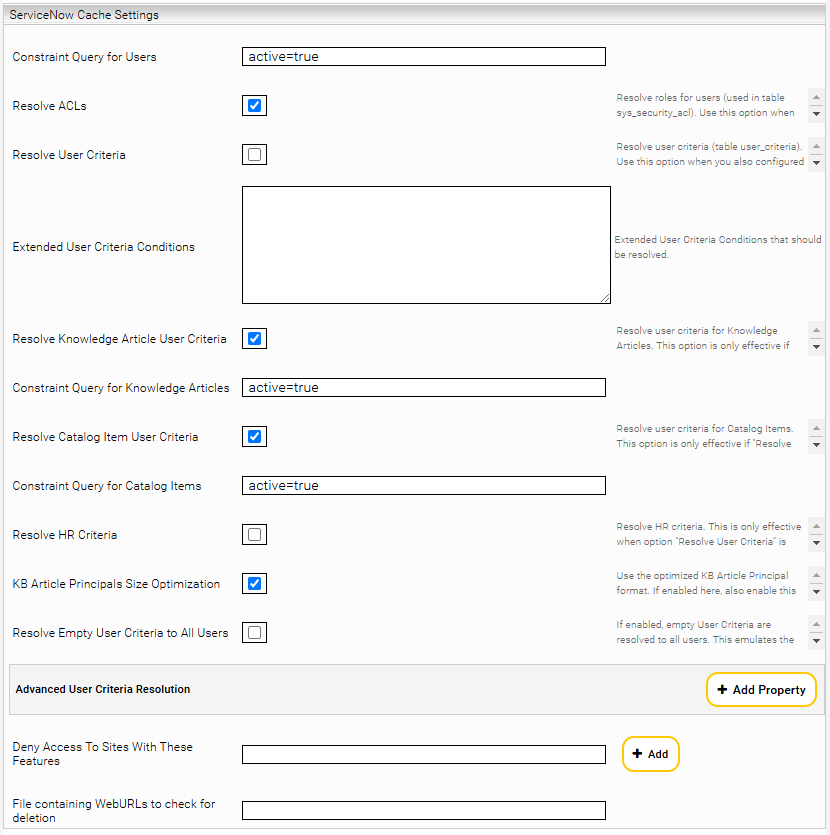
Constraint Query for Users | A constraint query to restrict which users are fetched by ServiceNow when updating the cache. For more information, see the chapter Constraint queries. This setting can be used to restrict the cache to relevant users. |
Resolve ACLs | Roles of the ServiceNow ACLs are resolved. Only ACLs at the table level (no support at the column level) are included. In addition, the “Condition” and “Script” fields are not supported. Use this setting if you use the “Use Access Control Lists” setting in the crawler. |
Resolve User Criteria | User criteria users, groups, roles, companies, locations, and departments are resolved. The “Script” field is not supported. Use this setting if you use the “Use User Criteria” setting in the crawler. |
Extended User Criteria Conditions | Extended User Criteria Conditions which should be resolved. The conditions can be specified either with the internal column name (e.g. "u_my_condition") or with the display name (e.g. "My Condition"). Important: Configure this setting identically to the setting in ServiceNow Crawler. Otherwise, the permission structure cannot be mapped correctly. |
Resolve Knowledge Article User Criteria | If this setting is enabled, the User Criteria for Knowledge Articles are resolved. For better performance or permission control, you can disable this setting if you are not indexing Knowledge Articles. |
Constraint Query for Knowledge Articles | A constraint query to restrict which Knowledge Article User Criteria are resolved. For more information, see the chapter Constraint queries. This option should be configured identically to the crawler. |
Resolve Catalog Item User Criteria | If this setting is enabled, the User Criteria for Catalog Items are resolved. For better performance or permission control, you can disable this setting if you are not indexing Catalog Items. |
A constraint query to restrict which category item user criteria are resolved. For more information, see the chapter Constraint queries. This setting should be configured identically to the crawler. | |
Resolve HR Criteria | Enable this setting if you are using HR Criteria in addition to User Criteria. This setting has no effect if Resolve User Criteria is disabled. |
KB Article Principals Size Optimization | Reduces the number of principal containers when user criteria are used. This setting is active by default and should not normally be disabled. However, if it is to be disabled anyway, it must also be disabled in the ServiceNow crawler for the permissions to work correctly. |
Resolve Empty User Criteria to All Users | If this setting is enabled, all empty User Criteria (User Criteria with no criteria set) are resolved to all ServiceNow users. This reflects the behavior in ServiceNow. You can disable this setting if you do not use empty User Criterias. |
Advanced User Criteria Resolution | See the next chapter. |
Deny Access To Sites With These Features | This setting is deprecated. |
File containing WebURLs to check for deletion | This setting is deprecated. |
Advanced User Criteria Resolution (Advanced Settings)
Here you can configure rules on how which user criteria are resolved in order to map special permissions in Mindbreeze InSpire. This is particularly useful if you use user criteria that are not supported by Mindbreeze InSpire by default.
This concerns user criteria for which “Advanced” is set (“Script”, except if the user criteria record was generated by an "HR Criteria”)

Setting | Description | ||||||||||
The User Criteria column/field in ServiceNow to which the "UC Selection: Column Pattern" is applied.
| |||||||||||
UC Selection: Column Pattern | The pattern that is applied to the User Criteria column/field ("UC Selection: Column Name"). The pattern is a Java regex where "." (dot) also matches on \n\r (e.g. relevant for field script). Note that a full match must be made on the field so that the "Result Action" is performed for a matching User Criteria. E.g. on the field value "My User Criteria" - "My User" would not match, but - "My User.*" would indeed match | ||||||||||
Resolution Action | Here you can define how to resolve the User Criteria for which "UC Selection: Column Name / Patter" match.
|
CSV Logging (Advanced Settings)

Setting | Descripton |
Log Objects to CSV | If enabled, statistics are logged to the file “objects-log.csv” in the current log directory. |
Log All Objects | If enabled, also successfully processed objects are logged to the CSV. Only has effect if Log Objects to CSV is active. |
Dump User Criteria to CSV | If enabled, all user criteria are written to the CSV file “user-criteria-dump.csv” in the current log directory. |
Dump HR Criteria to CSV | If enabled, all HR criteria are written to the CSV file “hr-criteria-dump.csv” in the current log directory. |
Appendix
Constraint queries
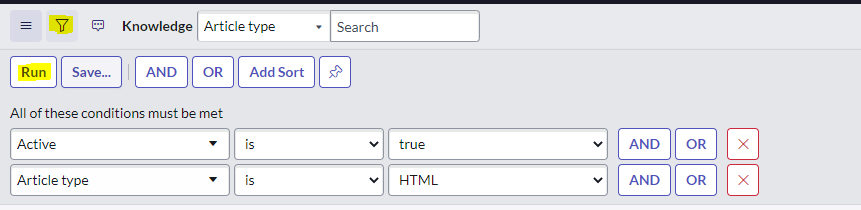
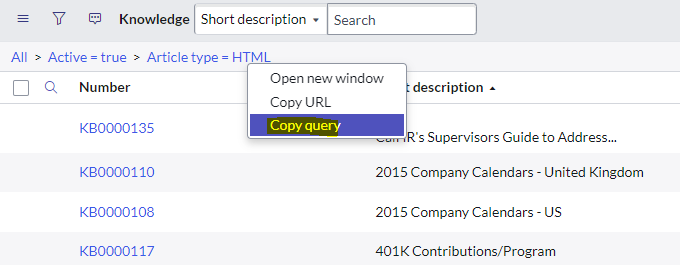
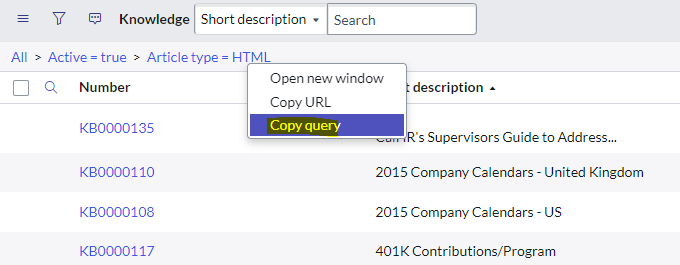
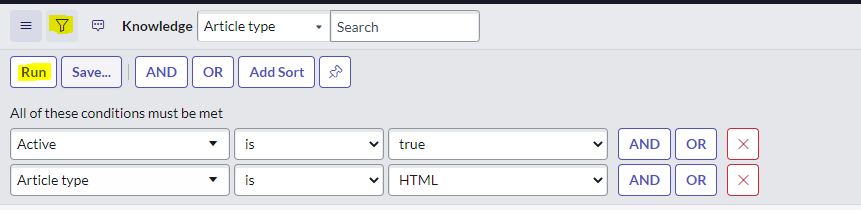
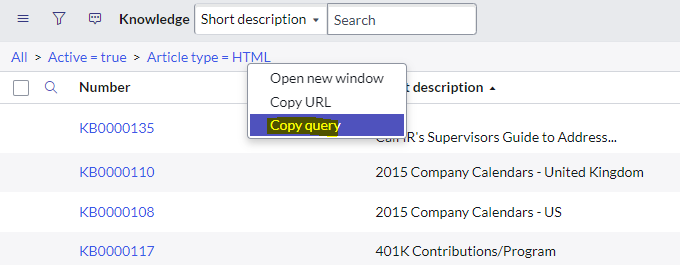
You can use filters to ensure that the crawler only indexes specific records. To do this, open any table in ServiceNow that you want to filter and apply the filter. Right-click on the filter expression and then click on the “Copy query” entry in the context menu. The filter expression copied from the screenshot below will look like this: active=true^article_type=text. You can define this expression in the configuration of the data source in the Mindbreeze Management Center; for example, under “Constraint Query for Knowledge Articles” or “Generic Tables.” Insert “Constraint Query.”
Missing permissions for fields
If you encounter the following exception in the crawler or the cache, it’s likely that you are missing access to a table that is referenced in the query:
Unable to fetch page for URL "https://mycompany.service-now.com/api/now/table/sc_cat_item?sysparm_suppress_pagination_header=true&sysparm_limit=1000&sysparm_offset=0&sysparm_query=active%3Dtrue&sysparm_no_count=false&sysparm_fields=sys_id HTTP status code: 403. Body: {"error":{"detail":"Field(s) present in the query do not have permission to be read","message":"Insufficient rights to query records"},"status":"failure"}
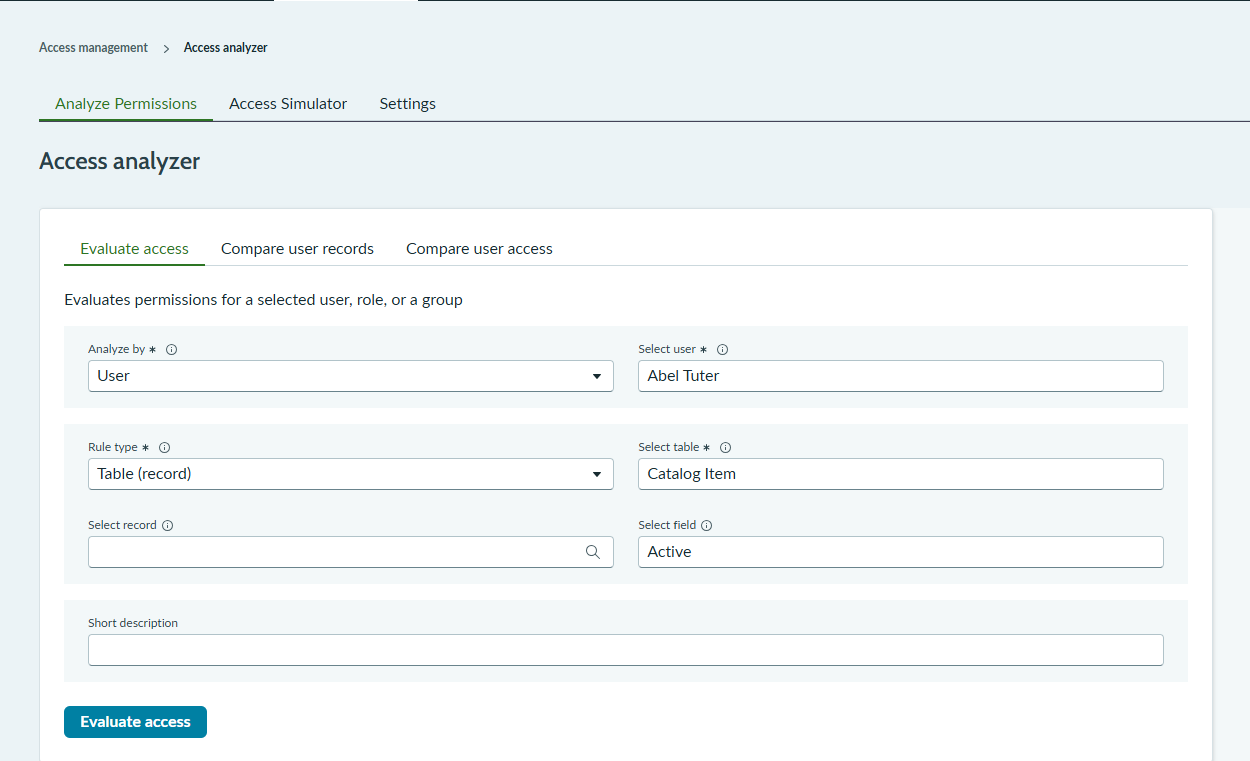
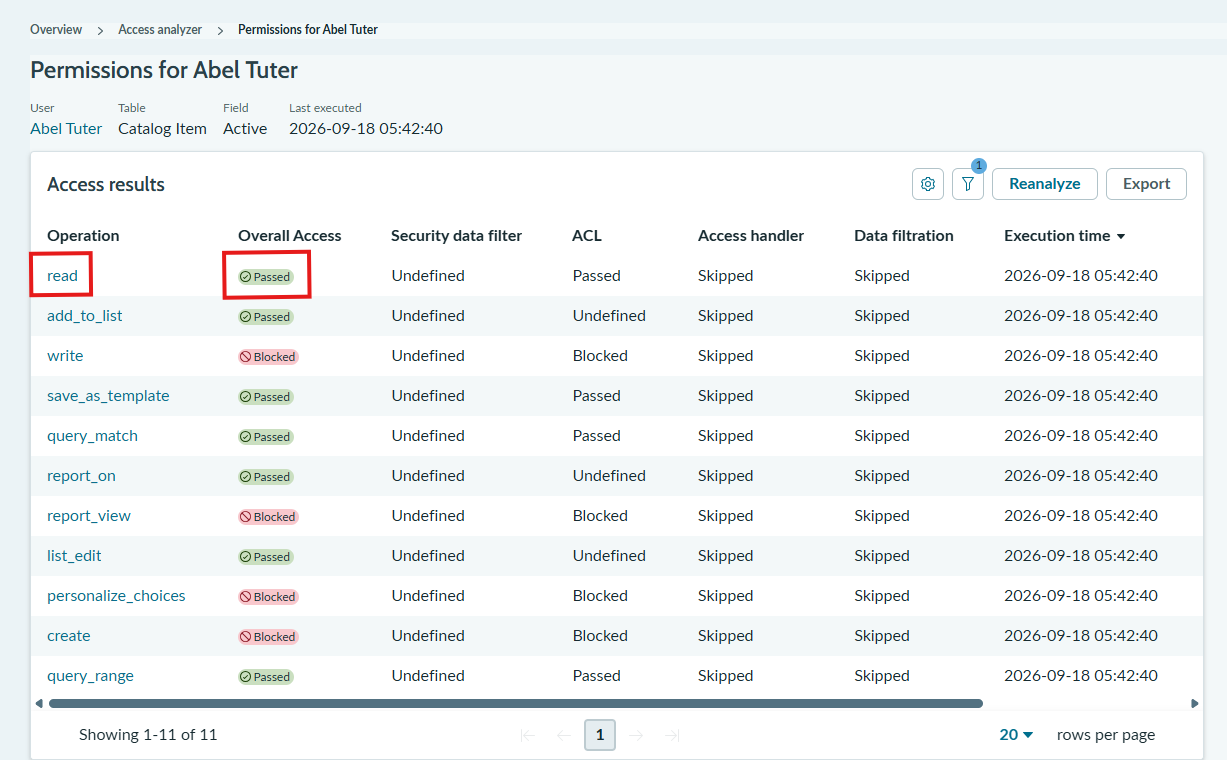
In this example, the default value of the connector refers to the field “active” in the table “sc_cat_item”.
The access to specific fields for a table can be checked in ServiceNow’s Access analyzer for the READ permission.
Access requirements for ServiceNow tables
This chapter describes which ServiceNow tables must be accessible for the ServiceNow connector to work. In addition, other ServiceNow tables are also mentioned which will be needed, if certain crawler and/or cache settings are to be used.
List of ServiceNow tables
Mandatory access
The access to the following tables is mandatory for the ServiceNow connector to work:
Content of the table | |
sys_db_object | Stores metadata about every table in the instance. |
sys_dictionary | Defines every field (column) across all tables. |
sys_properties | Stores system properties that control platform behavior, features and config. |
sys_user_role | Defines available roles in the system (e.g., itil, admin, approver_user). |
sys_user (only used by the Principal Resolution Service for the cache) | Core user table. |
sys_user_group (only used by the Principal Resolution Service for the cache) | Stores user groups (teams, departments, assignment groups). |
sys_user_grmember (only used by the Principal Resolution Service for the cache) | Users Groups (Relations). |
sys_user_has_role (only used by the Principal Resolution Service for the cache) | Users Roles (Relations). |
Hint: Please be aware that access to the mandatory tables only ensures that the connector is working. If access is only granted to the mandatory tables, the connector works but does not index any documents. For the indexing of documents, some crawler and cache settings are necessary which then need access to additional tables.
Please see the next chapter, for a full list of optional tables and the corresponding crawler and cache settings.
Optional access based on crawler and cache settings
The access to the following tables is needed based on the crawler and/or cache settings that are to be used:
Content of the table | Crawler/Cache Setting | |
kb_knowledge | Individual Knowledge Articles. | Crawler settings: Index Knowledge Articles |
kb_knowledge_base (only used by the Principal Resolution Service for the cache) | Knowledge bases (containers / categories of articles). | Cache settings: and are both used. |
kb_uc_can_contribute_mtom | Defines which User Criteria allow contribution / read access to knowledge bases or articles (Relations). | Crawler settings:
and are both used with either one of the following two settings: Extended User Criteria Conditions Cache settings: and are both used. |
kb_uc_can_read_mtom | Defines which User Criteria allow contribution / read access to knowledge bases or articles (Relations). | |
kb_uc_cannot_contribute_mtom | Defines which User Criteria blocks contribution / read access to knowledge bases or articles (Relations). | |
kb_uc_cannot_read_mtom | Defines which User Criteria blocks contribution / read access to knowledge bases or articles (Relations). | |
incident | Stores incident records | Index Incidents |
problem | Stores problem records (root cause analysis & permanent fixes). | Index Problems |
sc_cat_item | Catalog items | Crawler setting:
Cache setting: and are both used. |
sc_cat_item_user_criteria_mtom | User Criteria that allow visibility of catalog items (Relations). | Crawler setting:
and are both used with either one of the following two settings: Extended User Criteria Conditions Cache setting: and are both used. |
sc_cat_item_user_criteria_no_mtom | User Criteria that hide/block visibility of catalog items (Relations). | |
sc_category | Service Catalog categories (grouping of catalog items). | Crawler setting:
and are both used. Cache setting: and are both used. |
sc_category_user_criteria_mtom | User Criteria that allow visibility of categories (Relations). | Crawler setting:
and are both used with either one of the following two settings: Extended User Criteria Conditions Cache setting: and are both used. |
sc_category_user_criteria_no_mtom | User Criteria that hide/blocks visibility of categories (Relations). | |
sc_req_item | Requested items (each line item on a request/requisition). | Index Catalog Items |
sn_hr_core_condition (only used by the Principal Resolution Service for the cache) | HR specific conditions used in visibility / matching rules. | Cache settings: and are both used. |
sn_hr_core_criteria (only used by the Principal Resolution Service for the cache) | HR specific criteria definitions. | |
sn_hr_core_m2m_condition_criteria (only used by the Principal Resolution Service for the cache) | HR conditions HR criteria (Relations). | |
sys_attachment | All file attachments | Index Catalog Items |
sys_security_acl | Access Control List rules. | |
sys_security_acl_role | Shows which roles grant which ACLs (Relations). | |
user_criteria | Reusable visibility / access conditions (used in catalog, knowledge, etc.). | is used with either one of the following two settings:
|
Granular crawler permissions
If you would like to have more control over the permissions of the crawler user, you can define separate roles so that the crawler user has read access to the appropriate tables through the REST API. Create your own ACL rules for all these tables, because some tables have default ACL rules that only allow access to certain entries, which can lead to unexpected behavior.
Table or field permission
Based on the required tables (see above) the user must have read access to the following fields.
Data Tables (depending on which tables you want to index)
Field access | |
sys_attachment | ALL fields |
kb_knowledge | ALL fields |
sc_cat_item | ALL fields |
incident | ALL fields |
problem | ALL fields |
<<additional tables>> |
|
Metadata for tables (Type information – relevant for indexing)
Table | Field access |
ALL fields | |
sys_db_object | ALL fields |
sc_req_item |
|
General authorizations
Table | Field access |
| |
sys_user_group |
|
sys_user_grmember |
|
sys_user_has_role |
|
Authorization using ACLs
Table | Field access |
| |
sys_security_acl_role |
|
Authorization based on user criteria
Table | Field access |
ALL fields | |
sc_category | ALL fields |
For category items
Table | Field access |
ALL fields | |
sc_category_user_criteria_no_mtom | ALL fields |
sc_cat_item_user_criteria_mtom | ALL fields |
sc_cat_item_user_criteria_no_mtom | ALL fields |
For Knowledge Articles
Table | Field access |
| |
kb_uc_can_contribute_mtom | ALL fields |
kb_uc_cannot_contribute_mtom | ALL fields |
kb_uc_can_read_mtom | ALL fields |
kb_uc_cannot_read_mtom | ALL fields |
Authorization based on HR Criteria
Table | Field access |
ALL fields | |
sn_hr_core_m2m_condition_criteria | ALL fields |
sn_hr_core_condition | ALL fields |
Related Tables
Those tables are not accessed directly, but that have relationships to other tables that are fetched for indexing. Full table access is needed for all of them.
Tabelle | Needed for… |
sc_cat_item | |
sys_scope | all tables |
topic | sc_cat_item |
core_company |
|
cmdb_ci |
|
cmdb_ci_service | incident |
sys_glide_object | sys_dictionary |
cmn_location | sys_user |
cmn_department | sys_user |
sys_security_type | sys_security_acl |
sys_security_operation | sys_security_acl |
sc_homepage_renderer | sc_category |